Experimental database alternative powered by SQLite and S3
WordPress needs to use a database even if it runs on a serverless hosting platform. Hosting a MySQL database for serverless WordPress can require maintenance and costs almost matching that of traditional hosting.
ServerlessWP now includes an experimental option to use SQLite and S3 as an alternative to traditional database architectures.
The SQLite integration plugin enables WordPress sites to use a file-based database instead of MySQL/MariaDB.
S3 provides extreme stability and scalability as a data store at tiny cost for low traffic use cases.
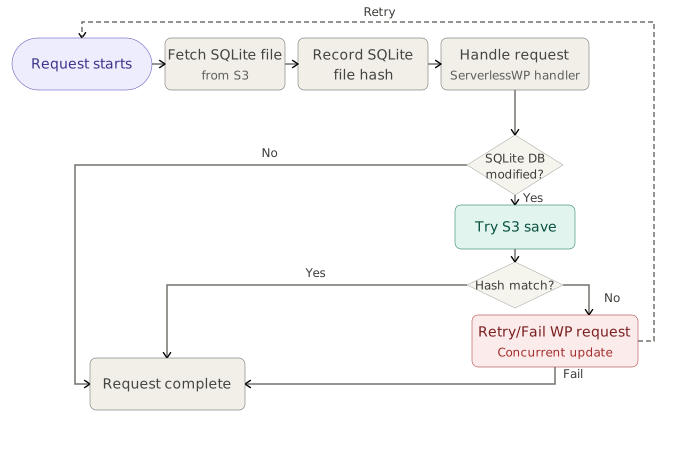
ServerlessWP fetches the SQLite database file from S3 before every request is handled. This is a relatively low latency operation if the S3 bucket is in the same region as the serverless deployment. It then writes the database file back to S3 if the data has changed. S3’s conditional write feature prevents one function invocation’s data changes from overwriting that of an other’s if they happen at the same time. In the case of a conflict, the last request is re-attempted.
SQLite + S3 is a great alternative for sites that have a high read-to-write ratio, like blogs, documentation sites, and informational sites. It’s not a great fit for high activity sites like forums or for e-commerce.
To use this feature you’ll need to create an S3 bucket, ideally in the same region as the website (usually defaults to us-east-1 for Vercel and us-east-2 for Netlify). Depending on the S3 or S3 compatible provider’s access methods, you’ll need to create an API key and secret that has access to read and write from the bucket. Then set the following environment variables for your ServerlessWP site to access the S3 bucket:
| SQLITE_S3_BUCKET | bucket name you created |
| SQLITE_S3_API_KEY | API key to access the bucket |
| SQLITE_S3_API_SECRET | API secret key to access the bucket |
| SQLITE_S3_REGION | region where the bucket lives – create it near your serverless functions |
| SQLITE_S3_ENDPOINT | optional: to update where the bucket is, like a Cloudflare R2 address |